
[ THE_SHORT_ANSWER ]
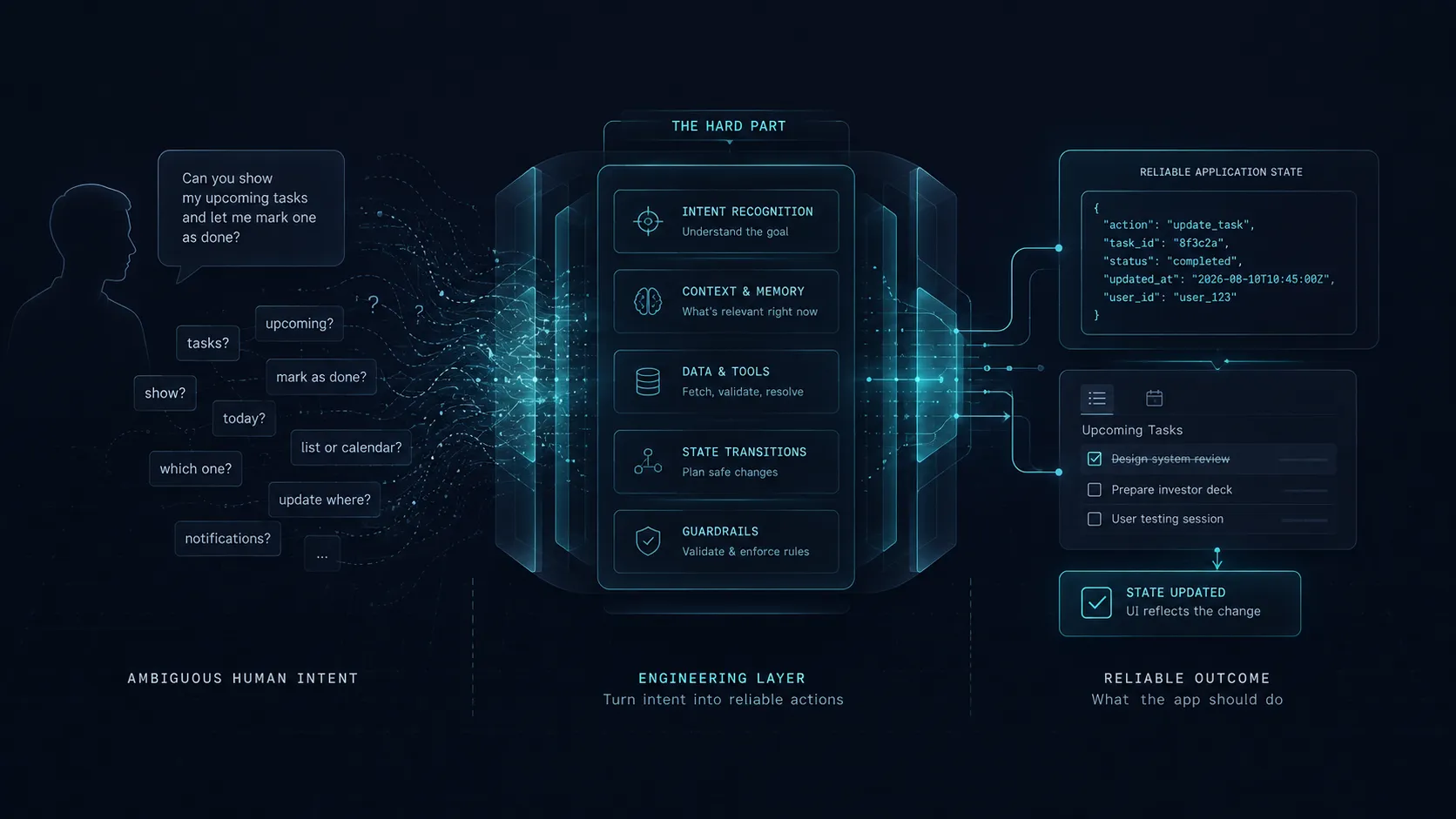
Generating a UI component tree from a language model response is a solved engineering problem. The hard part is everything upstream of it: extracting precise, unambiguous intent from natural language, maintaining consistent application state when the interface is assembled at runtime, and building guardrails that prevent a model mistake from producing a broken, dangerous, or embarrassing product experience. Those three problems are not solved by the generation step.
When people talk about the difficulty of GenUI, they tend to focus on the generation step: getting a language model to produce a structured response that maps onto a UI component tree reliably, without hallucinating component names, violating the schema, or returning a shape the renderer cannot interpret.
That problem is real, but it is largely solved. Google’s GenUI SDK provides the structured output constraint layer. Gemini’s function calling produces JSON that maps to typed component definitions. The schema validation layer catches malformed output before it reaches the renderer. The generation step, after a few weeks of integration work, becomes a reliable pipe.
The problems that remain unsolved (the ones that determine whether a GenUI feature is actually useful or quietly dangerous) are upstream of the generation. They are: what does the user actually mean, what does the application state need to be when the generated UI renders, and what prevents the model from assembling an interface that violates a business rule the model cannot be expected to know.
1. What GenUI actually is
Generative UI is not a chatbot with extra steps. The distinction matters because conflating the two leads to solving the wrong problems.
A chatbot takes a user message and returns a text response into a fixed, pre-designed chat interface. The interface never changes. Only the content changes.
GenUI takes a user message, a user action, or a user context, and returns structured output that assembles into a real application interface at runtime. The components that render, the data they display, the actions they expose: these are determined by the model response, within a defined component library, rather than by the developer ahead of time.
The practical example: in a conventional app, a user who says “show me the properties I saved last month” gets routed to a search screen with a date filter pre-populated. In a GenUI architecture, the model interprets that query and assembles a filtered property list component with the correct query parameters, a date-range chip showing the selected period, and a save-search action, without a developer having written the specific screen for “saved last month” queries.
This distinction makes GenUI genuinely powerful for products with high-variance user intent: dashboards, agentic task flows, highly personalised experiences. It also introduces the problems this article is about, because the model is now making product decisions at runtime, and those decisions can be wrong.
2. Generation is the easy part
The generation step has a clean problem structure: given a validated user input, produce a structured response that conforms to a defined schema. The model either produces valid output or it does not. The schema validator catches the failures. The fallback UI renders when validation fails. You can run a thousand test cases, measure the pass rate, identify the input patterns that fail, and tighten the system prompt or the schema until the failure rate is acceptable. It has a feedback loop, which is exactly what the upstream problems lack.
The upstream problems do not have this structure. They are messier, more contextual, and cannot be solved by tuning a single component in isolation.
3. The intent problem
Natural language is ambiguous by design. Humans communicate in natural language efficiently precisely because context, shared understanding, and conversational inference carry much of the semantic load. The same sentence means different things to different people in different situations.
“Show me the high-priority items” could mean: items flagged as high priority by the user, items the system calculates as high priority by due date, items assigned to the current user that are marked high priority, or the five most recent items regardless of flag because the user knows their team only uses that flag inconsistently.
In a conventional app, this ambiguity is resolved by the UI design. The “High Priority” filter button is defined by a developer who made a deliberate decision about what “high priority” means in this product. The definition is encoded in the filter logic, visible in the label, and consistent across every use.
In a GenUI architecture, the model must resolve this ambiguity at runtime from a natural language input, with no additional context about which interpretation this user, in this product, with this data model, intends. If the model guesses wrong (which it will, systematically, for ambiguous inputs), the generated UI shows the user something they did not ask for. The user sees a result that looks plausible but is wrong, without understanding why. They lose trust in the feature faster than if the feature had simply returned an error.
The solution is not better prompting. It is constraint. You have to make explicit decisions about which intent interpretations are supported, encoded in the component schema, function definitions, or structured output spec, and hand everything out of scope to a fallback: a conventional search screen, a clarification prompt, a “did you mean?” pattern. The model interprets the parts of the user’s intent you’ve explicitly defined. Everything else falls back.
This is exactly the same translation problem that appears in conventional software, described in AI Can Write the Code. It Still Can’t Tell You What to Build.: the hard part of software is not generating code from a description, it is turning fuzzy human intent into a precise, deterministic system. GenUI moves that translation problem from the developer-to-specification stage into the user-to-runtime stage. It does not eliminate the translation problem. It surfaces it in production, at scale, with real users as the test cases.
4. The state problem
A conventional Flutter screen has a defined state model. The developer specifies which data is loaded at mount, how user interactions update local state, what triggers re-renders, and which state is persisted between navigation events. The state machine is explicit, tested, and understood by everyone who worked on the screen.
A generated screen has a state model that is partially determined at runtime by a model response. The developer defines the component library and the state shape each component expects. The model selects which components render and what data they receive. The intersection (the actual state of the screen at runtime) is the product of those two things together, not either one independently.
This creates a class of state bugs that do not appear in conventional screens: state shapes that are valid per the schema but inconsistent with each other, component combinations that the developer never anticipated and never tested, user interactions on generated components that produce side effects the model did not account for when assembling the layout.
A concrete example: a GenUI dashboard assembles a property card component and a contact-agent action component together. The contact-agent action requires an agentId field in state. The property card component receives propertyData including an agentId field. The model correctly wires propertyData.agentId to the action component. But the property data was returned by a search query that sometimes returns properties without an assigned agent, in which case agentId is null. The schema allows null. The generated UI renders. The contact-agent button is visible. The user taps it. The action fires with a null agentId. The API returns a 422.
The bug is not in the model. The model assembled valid components with valid data connections. The bug is in the state contract between the property card, the contact-agent action, and the API: a contract that was never made explicit, because no developer had ever designed the specific composition the model produced.
Preventing this class of bug requires what conventional screen development requires: explicit state machines, typed interfaces between components, and a clear definition of which component combinations are valid and which are not. In a GenUI architecture, this is encoded in the component schema and the composition rules the model is given. It is more work than defining individual components, because it requires defining the relationships between components: not just what each component accepts, but which components can be composed together and under what conditions.
5. The guardrails problem
The generation step is probabilistic. Given the same input in slightly different phrasing or context, the model may produce different outputs. Most of the time, the outputs are valid and correct. Some of the time, they are valid per the schema but wrong per the product’s business rules.
Business rules are not encoded in the model. The model does not know that certain data is only visible to certain users, that certain actions require certain preconditions, that certain combinations of information should never appear together on screen for compliance reasons. The model knows what the schema allows. The schema allows whatever the developer defined.
If the developer defined a schema that allows the model to compose a component showing a user’s personal financial data with a sharing action component, the model may assemble that combination when asked a question that seems to justify it, even if the sharing action should never be available on screens showing that category of data. The generation step produces valid output. The validation step passes the schema. The UI renders. The guardrail that should have prevented this combination was never written.
This is the same problem as The Edge Cases Are the Product applied to runtime-generated interfaces: the failure mode is not in the happy path, it is in the combinations and conditions that nobody explicitly designed for, because nobody designed them for individually. The model assembled them from pieces that were each correct in isolation.
Guardrails in a GenUI architecture operate at three levels:
Schema-level constraints: The component library only exposes what is safe to expose. Sensitive data components are not available in the schema at all unless the session context satisfies the access requirements. The model cannot generate a component it is not given access to.
Composition rules: Explicit definitions of which components can appear together. These are either encoded in the schema through component dependency declarations, or enforced by a post-generation validation pass before rendering. A sharing action component that is incompatible with financial data components is marked as such in the composition rules. A generated layout that violates the rule fails validation and falls back.
Action allowlists: Every action a generated component can trigger is explicitly defined, scoped, and bounded. The model selects actions from the allowlist; it does not generate action handlers. An action that requires a precondition checks that precondition before executing, regardless of the interface state. The generated UI can invite an action that the system will refuse to execute, which is the correct behaviour when the model produced an incorrect composition.
Each level requires deliberate design work. The schema definition alone is significant engineering: it requires modelling the entire permission and composition space of the product, not just the individual components. It requires making explicit the business rules that were previously implicit in statically designed screens, so that the model can work within them without knowing them.
6. What this means in practice
The three problems above share a shape. In each one, the generation step delivers something real, and then stops precisely where the product decisions begin:
Layer | What the generation step gives you | What you still have to design |
|---|---|---|
| Intent | A structured response conforming to your schema | Which interpretations are in scope, and the fallback for everything else |
| State | Valid data wired into valid components | Which compositions are legal, and what happens when a permitted field is null |
| Guardrails | Output the schema permits | Schema constraints, composition rules, and action allowlists carrying the business rules |
| Failure | Validation that catches malformed responses | Fallback UI for responses that pass validation and are still wrong |
| Monitoring | Nothing | Logging of which compositions production actually produces, and which trigger fallbacks |
GenUI earns its complexity in specific situations: products where the user’s intent is genuinely high-variance, where the combinatorial space of possible interfaces is too large to design statically, and where personalisation or context-sensitivity creates real value for users. For most products, you’ll get a simpler, more reliable, more maintainable result from a well-designed conventional app than from a GenUI equivalent.
If GenUI is the right architecture for what you’re building, the engineering work is not primarily the model integration. The model integration is the most visible part and, with the right framework, the most straightforward. The real work is:
- Defining the intent space explicitly: which queries, actions, and user goals are in scope, and what the fallback is for everything else.
- Designing the state contract between components: which data each component requires, which combinations are valid, and what happens when the model produces a combination that was not anticipated.
- Building the guardrail layer: schema constraints, composition rules, action allowlists, and the fallback UI that renders when any of them catch a model error.
- Logging and monitoring the generated interfaces: what the model is actually producing in production, which compositions appear most frequently, which compositions trigger fallbacks, and whether the system is behaving as designed.
All four of those need real design work before the first generated interface ever reaches a user, and that work is what determines whether the GenUI feature you ship turns into a product capability or a production liability.
The model you’re building on is a highly capable tool operating inside an architecture you design: the architecture defines the space of valid outputs, and the model produces outputs within that space. You’re responsible for making sure the space is correctly defined, the invalid combinations are excluded, and the fallback behaviour actually works.
As Vibe Coding 16 Weeks Later describes in a different context: AI generates code inside the architecture you design, not in place of it. GenUI is the same relationship one layer up, generating interfaces inside the component contract you define rather than deciding what that contract should be. Generation keeps getting faster every quarter. The architecture that decides whether that speed is safe to ship is still work only you can do.
[ NEXT STEP ]
Building something that involves AI-driven interfaces or agentic workflows?
The Product Blueprint is where we scope the intent space, define the component contract, and design the guardrail architecture before any generation logic is built. GenUI features built on a well-designed foundation ship reliably. GenUI features built without one create production liabilities that compound.
BOOK_A_ROADMAP_CALL →